
Evaluate KiviBoot-Tiny on Efinix Ti60
Register for the evaluation portal to download the Ti60 Getting Started Guide and request the evaluation package for the TRS-STAR T*Square Ti60-256 Education Board.

Start with the Efinix Ti60 reference, then build, sign and encrypt your application with KiviBoot-Tiny.
Adding secure boot to an FPGA-based system connects several parts of development: the FPGA configuration, processor startup, application build and preparation of firmware images. A working reference helps you understand those connections before adapting them to your product.
The KiviBoot-Tiny reference for the TRS-STAR T*Square Ti60-256 Education Board provides that starting point. It includes an FPGA configuration with KiviNanoBL, a matching KiviSecureBL image, a signed and encrypted LED-blink application, platform support and image preparation tools.
You can first run the supplied application without rebuilding either bootloader. Then you can rebuild the example or introduce your own application using the Efinity RISC-V Embedded Software IDE or a Make-based workflow.
The reference uses an Efinix Titanium Ti60F256 FPGA with a Sapphire RISC-V soft processor implemented in the FPGA fabric. The processor executes both bootloader stages and the application.
KiviNanoBL, the initial bootloader stage, resides in on-chip RAM as part of the FPGA configuration. It loads and starts KiviSecureBL, which executes from external HyperRAM. KiviSecureBL then handles the signed and encrypted application image before transferring control to the application, also in HyperRAM. The bootloader and application images are stored in external SPI flash.
The protected FPGA configuration establishes the starting point for this boot path. KiviBoot extends the chain of trust to the separately stored bootloader and application images. Protecting the FPGA configuration therefore remains part of the complete design: application verification depends on the boot components that perform it.
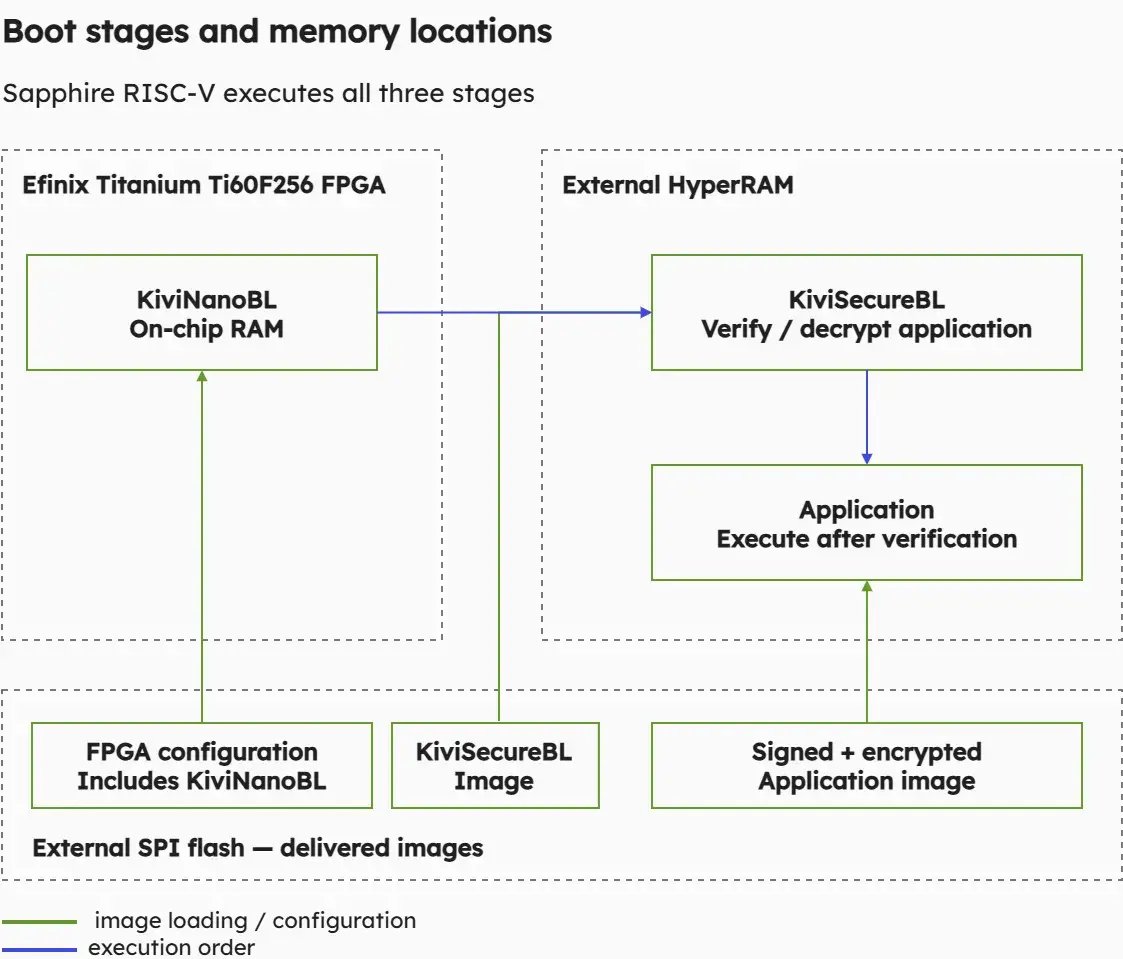 Figure 1. The Sapphire RISC-V processor executes KiviNanoBL from on-chip RAM, then KiviSecureBL and the application from HyperRAM. Their images are supplied from SPI flash. The initial FPGA configuration must be protected.
For software developers, this architecture provides a defined integration point. The application must match the supplied platform and memory layout, and its compiled image must be prepared in the format expected by KiviSecureBL.
The first evaluation step uses three ready-to-program HEX files: the FPGA configuration containing KiviNanoBL, the KiviSecureBL image and the signed and encrypted reference application.
These occupy separate regions of SPI flash. Programming them with the Efinity Programmer establishes the reference configuration without requiring an application build, key generation or an IDE project import.
After a reset that reconfigures the FPGA from flash, UART messages show the progression through the bootloader stages to the application. The reference application toggles a status LED approximately once per second and, with logging enabled, prints dots at the same rate.
This gives you an observable starting point before changing source code or build settings. If your modified application later fails to start, you have a known reference against which to compare its platform configuration, image preparation and deployment.
A successful LED-blink startup demonstrates the supplied execution path. Assessing rejection of invalid images requires additional tests. Startup alone does not establish the complete security behaviour of a product.
Once the reference runs, the next step is to rebuild the application. The delivery includes the board support package, application sources, Makefiles and platform-specific settings needed for the Ti60 example.
The Efinity RISC-V Embedded Software IDE can import the supplied application through its BSP project workflow. The delivery already defines the platform and relative paths. The local Efinity Programmer installation path must be configured for programming operations. Developers who prefer a shell can use the corresponding Make targets.
The application workflow has four main steps:
The corresponding targets include sign, generate_pgm_hex and program_app. They make image preparation and deployment explicit parts of the development process.
Signing and encryption serve different purposes. Signature verification checks the application image’s authenticity and integrity. Encryption addresses the confidentiality of the stored application. Both are used in the supplied reference flow. An unsigned application binary is not a bootable substitute for the prepared image.
The delivered KiviSecureBL image is tied to matching development credentials. Applications must use those credentials during the initial evaluation. Generating a new key pair without updating the corresponding boot components breaks that match.
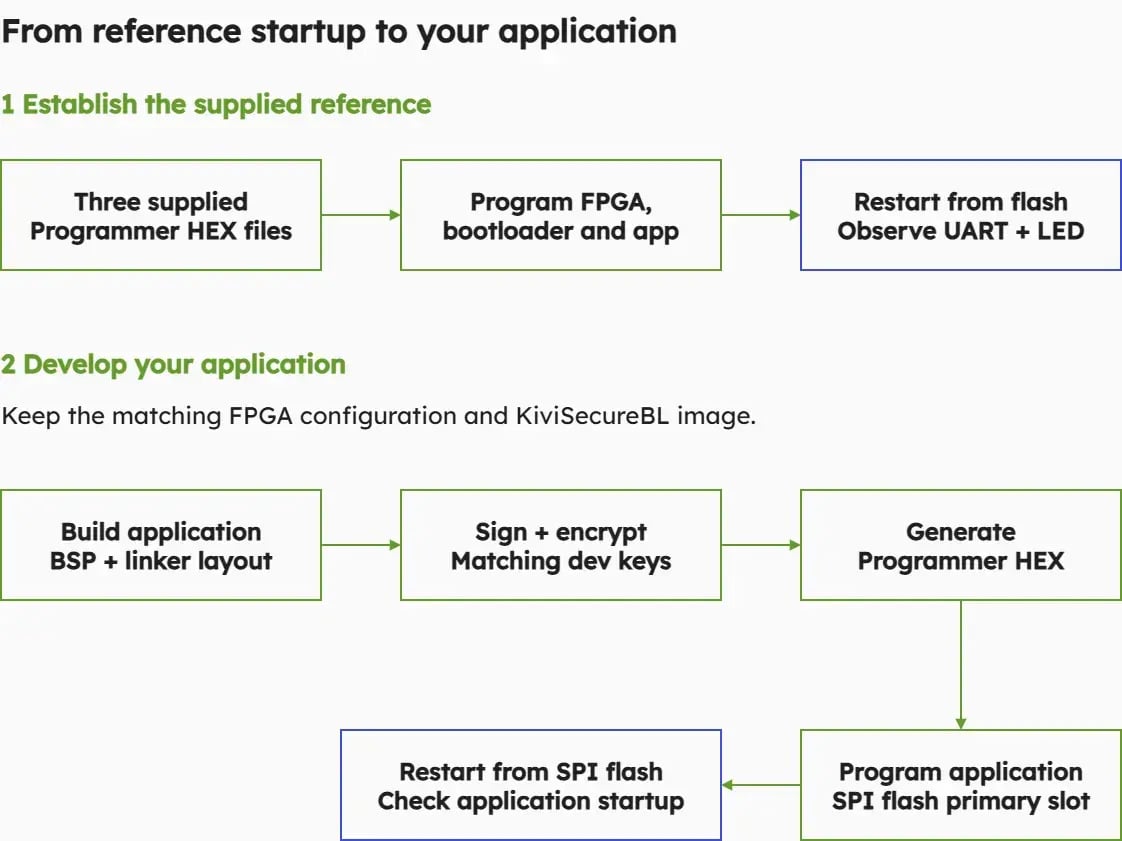
Figure 2. First program and start the supplied reference. Then build, sign, encrypt and program your application while retaining the matching boot components, and restart from SPI flash.
During application development, you can keep the supplied FPGA configuration and KiviSecureBL image in place while replacing the application image. This lets you concentrate on how your software connects to the boot process.
The LED-blink project also provides a starting point for a small application of your own. You can copy the project, change its name and source code, and retain the supplied platform support and image preparation flow.
The memory layout matters. In this reference, KiviSecureBL copies the application image into RAM starting at 0x00100000. The first 0x400 bytes contain image metadata, so executable application code starts at 0x00100400.
The supplied linker configuration accounts for this arrangement. Replacing it with a default BSP linker script can place the application at an address that does not match the bootloader’s expectations. Keeping the platform definitions, linker configuration and signing settings consistent is therefore part of integration.
Application initialization matters as well. The example uses platform_init() before accessing platform functions such as LEDs and UART. Applications using interrupts must set up their interrupt handling explicitly: KiviSecureBL clears machine interrupts before handing over control, so the application must configure its trap entry and enable the interrupts it needs.
These details define the boundary between bootloader and application. The reference helps you examine that boundary before introducing a larger software stack.
The guide also describes debugging through the Efinity RISC-V IDE using GDB and OpenOCD. This loads the application ELF into RAM over JTAG and supports familiar development tasks such as stopping at main, stepping through code and inspecting state.
That debug download follows a different path from starting a signed application through KiviBoot from SPI flash. A successful debug session helps assess application behaviour, but it does not confirm that signing, encryption, flash placement and bootloader verification work together.
Use the debug path to investigate application code. Use a restart from the programmed flash images to check the deployed boot workflow. Keeping these checks distinct makes failures easier to locate.
The prepared reference reduces the work needed to reach a first application startup on the supported board. Product integration adds requirements that the walkthrough deliberately leaves outside its scope.
Development credentials must be replaced with production credentials. Signing private keys need appropriate protection, and device-side key provisioning must match the target architecture. Changes to credentials embedded in the boot components can require rebuilding those components and generating a new FPGA configuration.
The product also needs defined behaviour for verification failures, firmware updates, recovery and rollback prevention. These requirements must be assessed for the intended system. They cannot be inferred from the successful startup of the reference application.
The guide covers the supplied Ti60-256 platform and a standalone application. Rebuilding the bootloaders or adapting the design to another board is a separate integration task to discuss with KiviCore.
Starting with the reference makes that discussion more concrete. You can identify how your application fits the memory layout, where image preparation belongs in your build process and which platform or security requirements need further work.
The Ti60 Getting Started Guide provides the programming instructions, IDE setup, application example and troubleshooting information for this workflow.
Register at the eval portal to download the guide and review the implementation details. When you are ready to try it on the TRS-STAR T*Square Ti60-256 Education Board, request the KiviBoot-Tiny evaluation package through the portal.
The supplied reference lets you begin with a working application, then explore the changes needed to connect your own software to verified startup.