
Evaluate KiviBoot-Linux
Access the Linux Secure Boot Software User Guide or request an evaluation package to explore KiviBoot-Linux.
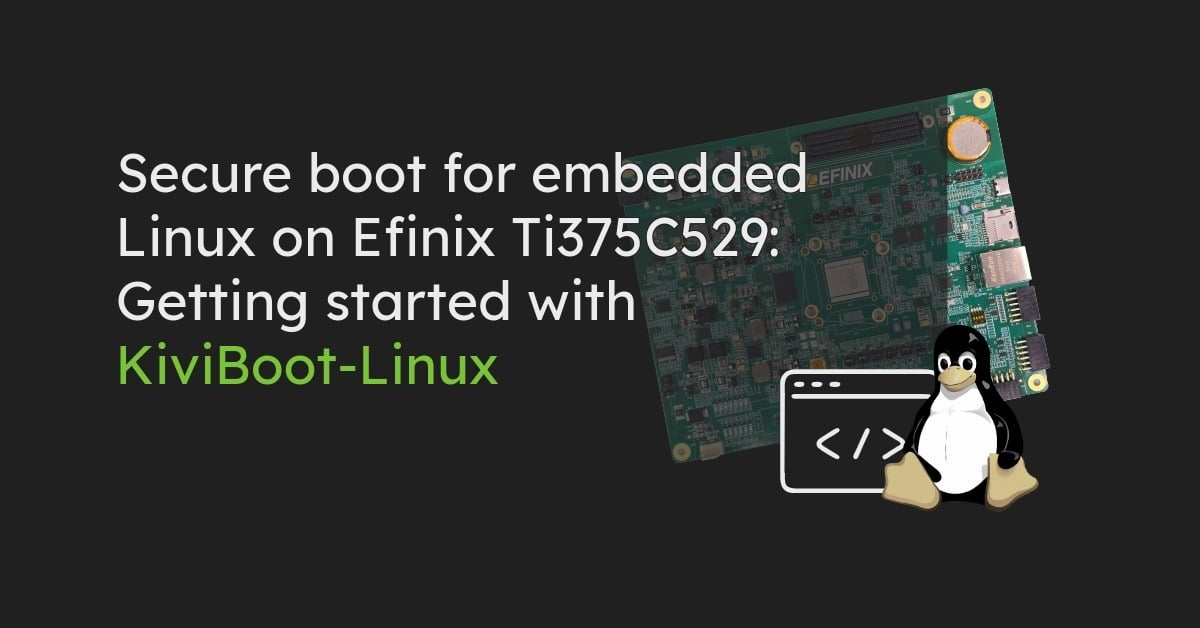

Evaluate Linux Secure Boot on Efinix Ti375C529 with prebuilt images and KiviBoot-Linux.
© Original Tux artwork by Larry Ewing (lewing@isc.tamu.edu), created using GIMP.
Bringing up embedded Linux on an FPGA-based SoC involves several components: the initial bootloader, platform firmware, U-Boot, the Linux kernel and the root filesystem. Adding secure boot introduces another requirement: the system must verify the relevant software components before allowing execution to continue.
For developers evaluating secure boot, building and configuring the complete FPGA and software environment can take considerable preparation. A reference implementation helps separate the initial evaluation of security mechanisms from the work required to integrate them into a specific product.
KiviBoot-Linux provides such a reference for the Efinix Titanium Ti375C529 development board. The evaluation package includes prepared boot images and a Linux system, allowing developers to examine the boot sequence and test verification behavior on actual hardware.
The accompanying Linux Secure Boot Software User Guide describes the required tools, hardware setup, programming procedure and expected console output.
The reference implementation targets the Efinix Titanium Ti375C529 Development Kit (Ti375C529-DK), using the Sapphire RISC-V SoC architecture. The evaluation combines KiviCore's two-stage secure bootloader KiviBoot-Linux with OpenSBI, U-Boot and embedded Linux. The boot components are distributed between the board's SPI NOR flash and a microSD card.
The package provides:
No FPGA project needs to be created or compiled in the Efinity IDE. Developers use the Efinity Programmer to write the supplied flash image and prepare the microSD card with the provided Linux image. This allows the initial evaluation to focus on the secure boot process rather than FPGA design or software compilation.
Secure boot relies on establishing trust before executing subsequent software components. In the Ti375C529 reference, the boot process begins with the FPGA configuration and continues through several software stages before Linux starts.
Initial boot stage (KiviNanoBL): After power-on, the FPGA loads its configuration from the onboard SPI NOR flash. KiviNanoBL is embedded in this configuration and executes from on-chip memory. Its task is to load and verify KiviSecureBL before transferring control to the next stage.
Secure bootloader stage (KiviSecureBL): KiviSecureBL loads the signed OpenSBI/U-Boot payload from SPI flash and verifies it before execution. Separating the initial boot stage from the subsequent loader allows the boot process to progress from a small initial component to the larger software environment needed for Linux.
Preparing and verifying Linux (OpenSBI and U-Boot): OpenSBI initializes the RISC-V machine-mode environment and transfers control to U-Boot. U-Boot then loads boot.fit from the microSD card. The FIT image contains the Linux kernel and device tree. In the supplied reference, U-Boot checks the configuration signature using RSA-4096 with SHA-256, verifies the relevant image hashes and decrypts the kernel and device tree before starting Linux.
Starting the operating system (Linux): After the verified boot components have completed their tasks, Linux starts, mounts the root filesystem from the microSD card and presents a login prompt. The reference therefore demonstrates how verification can be applied across multiple boot stages, rather than treating Linux startup as a single operation.
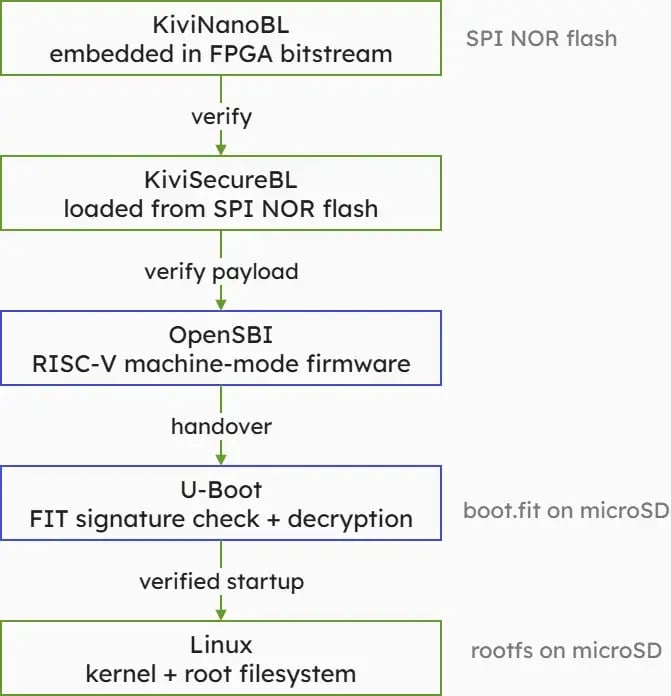
Figure 1: KiviBoot-Linux boot chain on the Efinix Ti375C529.
The evaluation uses a prepared hardware and software configuration. Developers need the Ti375C529 development board, a Windows host with the required programming tools, a microSD card and a serial terminal. The initial setup consists of three main activities.
Prepare the SPI flash. The supplied combined flash image is programmed to the board's SPI NOR flash using the Efinity Programmer. It contains the FPGA configuration and the software components required for the initial boot stages.
Prepare the Linux image. The supplied microSD image is written to a microSD card. It contains a FAT32 boot partition with boot.fit and an ext4 partition holding the Linux root filesystem.
Start and observe the boot process. With the programmed SPI flash and prepared microSD card, developers can restart the board and monitor the boot sequence through the serial console.
The console output identifies the successive boot stages, from KiviNanoBL and KiviSecureBL through OpenSBI and U-Boot to Linux. This is useful during development because it makes the transitions between boot components observable. Developers can identify which stage is executing and distinguish problems in the initial bootloader, platform firmware or Linux startup. The Linux Secure Boot Software User Guide provides the detailed setup instructions, required tool versions and expected console output for reproducing the evaluation.
A successful Linux startup demonstrates that the supplied boot components work together. For a secure boot evaluation it is equally important to observe what happens when verification fails. The KiviBoot-Linux evaluation package includes two deliberately corrupted SPI flash images for this purpose.
Test 1-Corrupted KiviSecureBL: In the first test, KiviSecureBL has been modified. KiviNanoBL detects a SHA-256 hash mismatch and stops the boot process instead of transferring control to the corrupted component.
Test 2-Corrupted OpenSBI payload: In the second test, KiviSecureBL remains intact, but the subsequent OpenSBI payload has been corrupted.
KiviNanoBL successfully starts KiviSecureBL. The next verification then fails, and KiviSecureBL aborts the boot process before executing the invalid payload.
These tests demonstrate an important property of the reference implementation: a verification failure prevents the affected boot sequence from continuing. They also help developers understand which boot stage is responsible for checking the next component and how a failed verification becomes visible in the system logs.
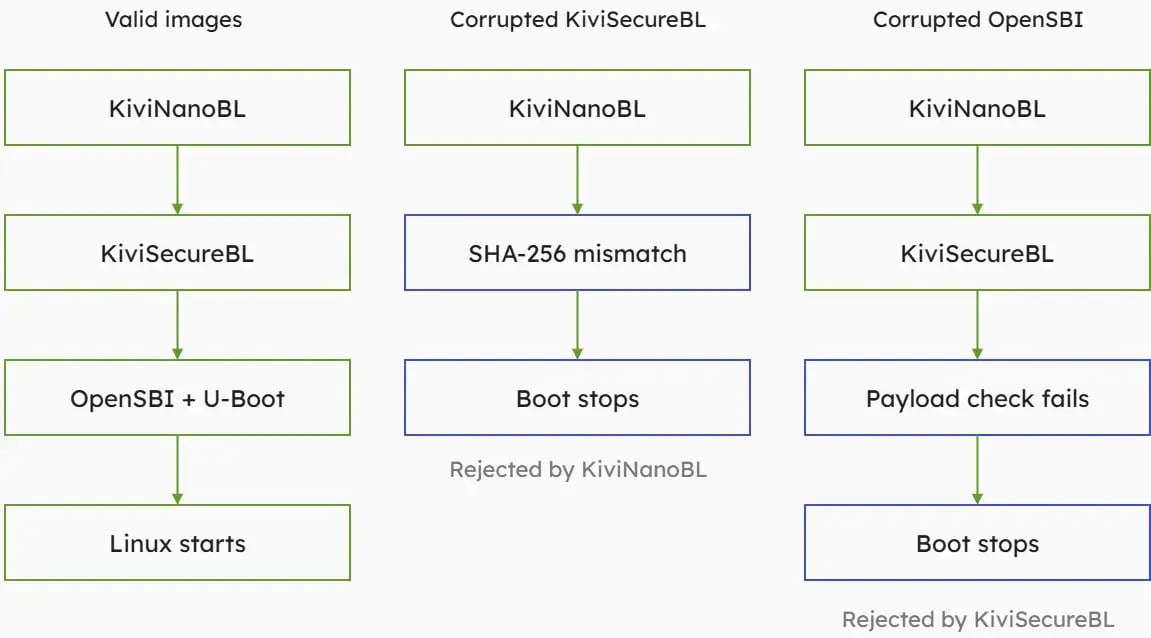
Figure 2: Successful Linux startup compared with verification failures in KiviNanoBL and KiviSecureBL.
The supplied reference provides a starting point for evaluating KiviBoot-Linux and understanding its interaction with the Efinix platform. Integrating secure boot into a product requires additional decisions specific to the target system. These include the provisioning and protection of production keys, the configuration of the hardware root of trust and protection of the initial FPGA configuration. The boot components and software images must also be adapted to the intended hardware and software environment. Firmware updates, recovery procedures and rollback prevention require consideration within the complete product architecture. A successful evaluation boot does not by itself establish that these mechanisms have been implemented.
The reference is therefore intended to help developers examine the boot architecture and verification behavior before addressing the requirements of their own product integration.
KiviBoot-Linux provides a practical starting point for evaluating secure boot on an embedded Linux system using the Efinix Titanium Ti375C529.
The prepared reference allows developers to examine the boot stages, observe signature verification and decryption during Linux startup, and test how the system responds to corrupted boot components.
For the complete setup procedure, expected console output and troubleshooting information, register for the Linux Secure Boot Software User Guide through the KiviCore Evaluation Portal. You can also request an evaluation package to explore KiviBoot-Linux on the supported development platform.